
Your Dashboard
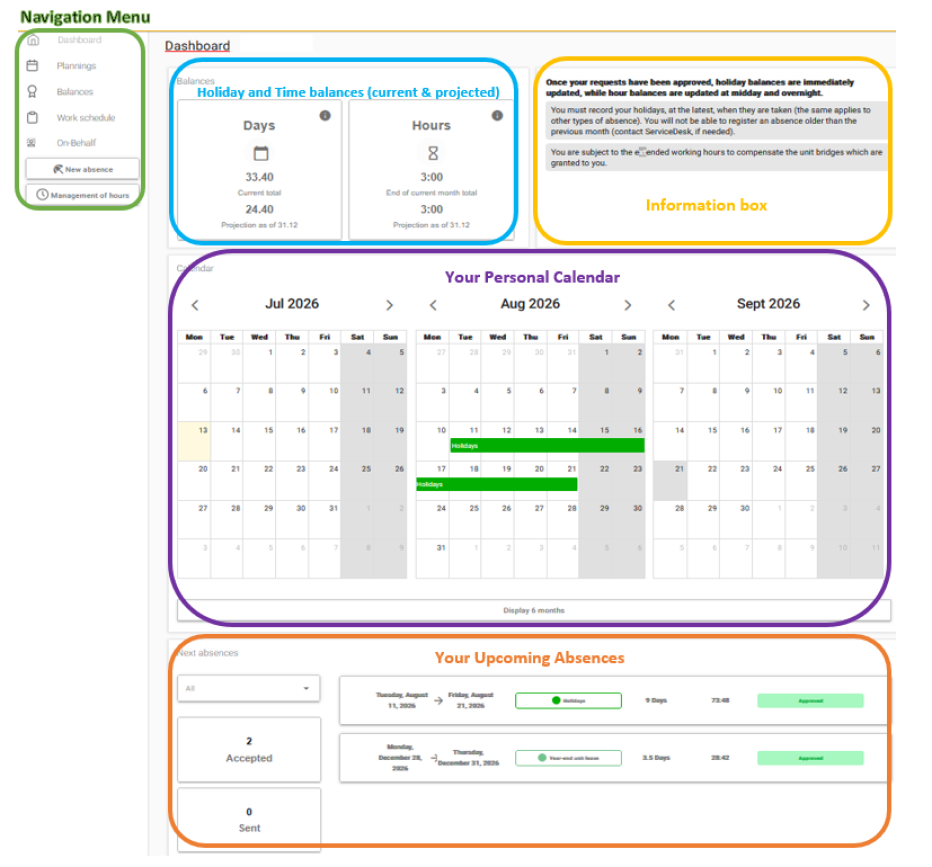
Navigation Menu
The navigation menu allows you to access the different pages of your absences account.
- Dashboard: an overall and summarized view of your absences and balances
- Calendars: displays your unit calendar and your personalized calendars
- Balances:
- Detailed view of your balances for the year
- “My Requests” tab: your recorded absences
- “Hours” tab: hours that have been added
- Reports: access to various reports, vacation entitlement calculations, and departure simulations
Your Detailed Balances
The “Balances” panel displays:
- Your total vacation day balance (carried-over balance + annual entitlement + loyalty days), both as of today and projected to 31 December or the end of your contract
- Your total hours balance (additional hours, overtime hours, Sunday/public holiday hours), both as of today and projected to 31 December or the end of your contract
- Paternity leave and caring for a seriously ill child days are not included in the vacation balance. They are tracked separately.