This page provides useful instructions and recommendations for managing your documents on a regular basis.
Its purpose is to simplify day-to-day and intermediate document management, while ensuring the preservation and traceability of the institution’s activities for archival purposes.
Effective organization of commonly used documents makes everyone’s work easier by allowing you to:
- Organize your documents as soon as they are created
- Ensure business continuity
- Facilitate future transfers to the EPFL Archives
You can find more information in the Pre-Archiving Guide. If needed, the EPFL Archives team is here to help!
At EPFL, records management is not governed by any regulations. Each department and laboratory is free to organize its own internal procedures:
- How are documents classified?
- Who is responsible for monitoring this classification?
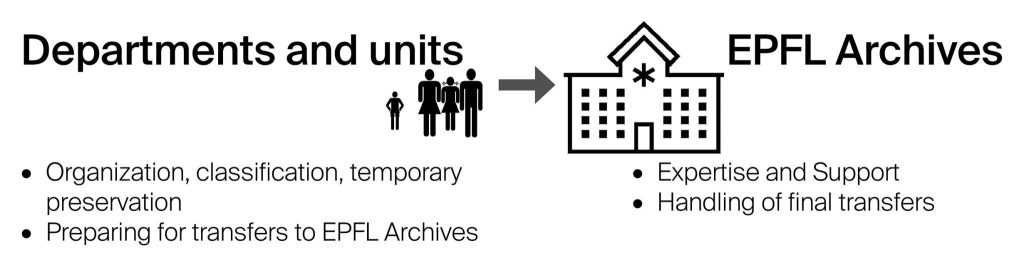
- Current documents : active documents used on a daily basis by departments to perform their tasks.
At this stage, the documents may still be updated or modified. - Intermediate documents : documents useful for reference or as evidence, but which are no longer in daily use. Generally, these documents are stored in separate locations by the producing department : specific servers, restricted shared directories, dedicated storage units.
At this stage, the documents no longer change. They may be consulted in accordance with the framework established by law. - Final documents / permanent records : documents selected for long-term preservation due to their heritage, historical, administrative, or scientific value. Once transferred to the Archives, they can no longer be edited. Access to them is unrestricted, in accordance with the law.
- Pre-archiving and transfer : operations carried out by the producing departments, in collaboration with the EPFL Archives.
- Destruction : operation carried out in accordance with legal deadlines and after approval by the EPFL Archives.
When an employee leaves, the documents under their responsibility must be filed in the department’s or unit’s official storage space, not in a personal space, which may be lost.
If there are confidential documents protected by a password, it is essential that the employee provide access credentials and/or transfer responsibility to another member of the department before leaving.
Simple rules make it easier to manage documents on a day-to-day basis from the moment they are created and simplify their future transfer to the Archives.
- File documents as soon as they are created according to a structured filing plan
- Organize documents by activity or project (avoid “catch-all” folders)
- Keep only final, approved versions (delete unnecessary drafts)
- Prefer open or standard formats: .pdf, .pdf/a, .docx, .xlsx, .csv, .tiff, .txt, etc.
- Verify that no files are password-protected (passwords prevent access to and archiving of content)
- Use readable file names without special characters (accents, apostrophes, semicolons, etc.) or spaces
- Comply with confidentiality and data protection rules
- Label files with basic information and comments: date, author, format, size, brief description, context…
- Prioritize a single institutional shared space over separate local copies (server, SharePoint, EDM, etc.)
- Avoid storing data in personal or non-institutional spaces (Google Drive, Dropbox, personal OneDrive, etc.)
These tools do not guarantee data longevity, confidentiality, or institutional control. Designed for temporary or collaborative use, they should not be used as a long-term storage solution.
- Keeping unnecessary drafts
- Keeping intermediate versions that contain no useful information
- Giving files unintelligible or coded names
- Using personal Google Drive or Dropbox accounts
- Storing HR or sensitive documents in unsecured spaces
- Organizing by employee name rather than by activity or project
- Using generic folder names: “Misc,” “To sort,” “Old,” “Personal Archive”
- Keeping an entire email inbox without sorting or organizing
Particular attention must be paid to specific categories of documents:
- personal data subject to legal obligations (LPD)
- sensitive data (health information, disciplinary actions, interviews, etc.)
- contracts, agreements, supporting documents
- documents subject to legal retention periods
Identifying these documents from the beginning ensures their security, compliance with retention periods, and prevents unauthorized disclosure.
If you have any questions regarding retention schedules, access, or destruction, please contact the EPFL Archives.
Emails are documents too, dense with information. Proper management makes them easier to read, store, and archive.
As soon as possible:
- Create subject-based folders in your email and organize your emails
- Keep only messages with informational or evidence value
- Save important emails in a themed folder or by project
- Save attachments in the location where you store your documents (server, SharePoint, shared space, etc.), and not just in your email
- Never archive an entire mailbox as-is
- Sort through them regularly
The classification scheme provides a hierarchical and logical structure that allows documents to be organized according to the unit’s activities and responsibilities. Its objectives are to:
-
Quickly find information
-
Organize documents by function or business process (e.g., human resources, research project management, communications, financial administration, etc.)
-
Ensure consistency in the management of generated documents (all projects of the same type are filed in the same location, regardless of the year or the person who handled them)
-
Facilitate the application of retention periods defined in the retention schedule
Example of a classification scheme for a research laboratory:
| Code | Title | Sub-activities |
| 01 | Laboratory administration | Budget, correspondence, annual reports |
| 02 | Research projects | Funded projects, final reports, publications |
| 03 | Staff and Human Resources | Personnel files, job descriptions |
| 04 | Communication and outreach | Articles, conferences, dissemination |
The EPFL Archives assist departments and units in creating or revising their classification scheme.
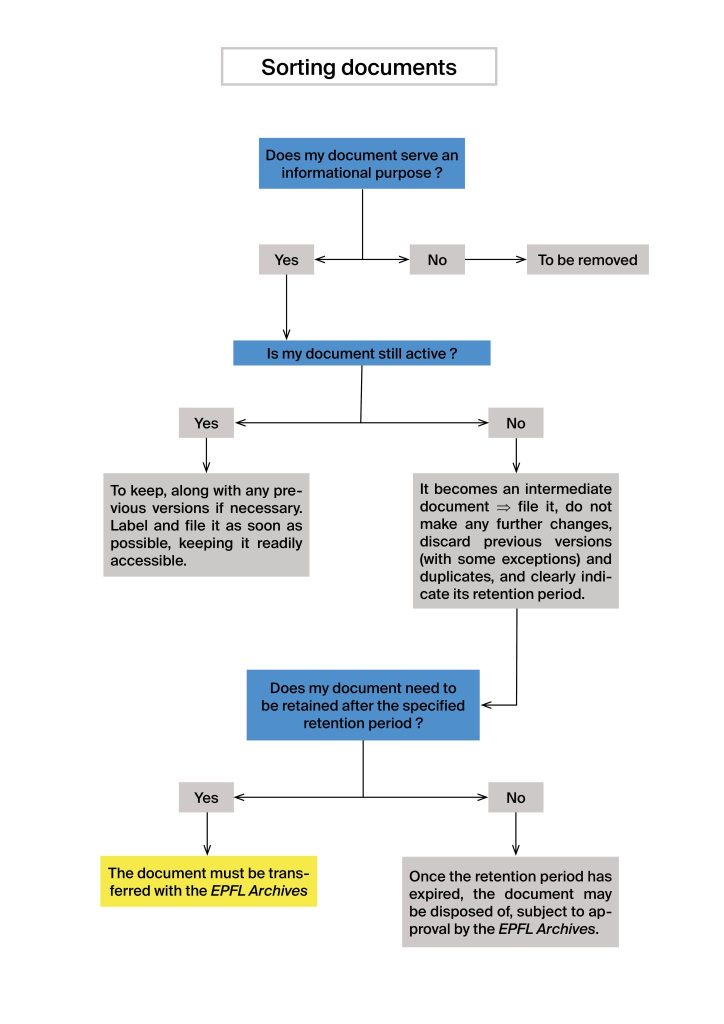
A quick and easy sorting process helps you determine what should be kept, archived, or discarded.
The diagram below provides a decision-making matrix to guide you step by step through the process of evaluating a document: