
Before using an EPFL software, it is mandatory to check if its use is compliant, here is the regulation.
The tool to verify and validate the use of an EPFL software is here.
And send back to us by email the confirmation you find here.
The company that created Flux 2D / 3D was bought by Altair HyperWorks.
As a result, Flux must be migrated to Altair HyperWorks.
This change is inescapable because new versions of Flux only exist inside HyperWorks.
As a result, older versions of Flux do not work with the new license server and must be uninstalled.
This page describes how to install Flux 2D-3D 2025
You need to refer to the preparation phase to activate the administrator account.
Installation of 2D-3D Flux 2025
With a session connected to the administrator account,
Launch the file hw2025_win64.exe from the following address:
I:\simul\altair\hyperworks\2025
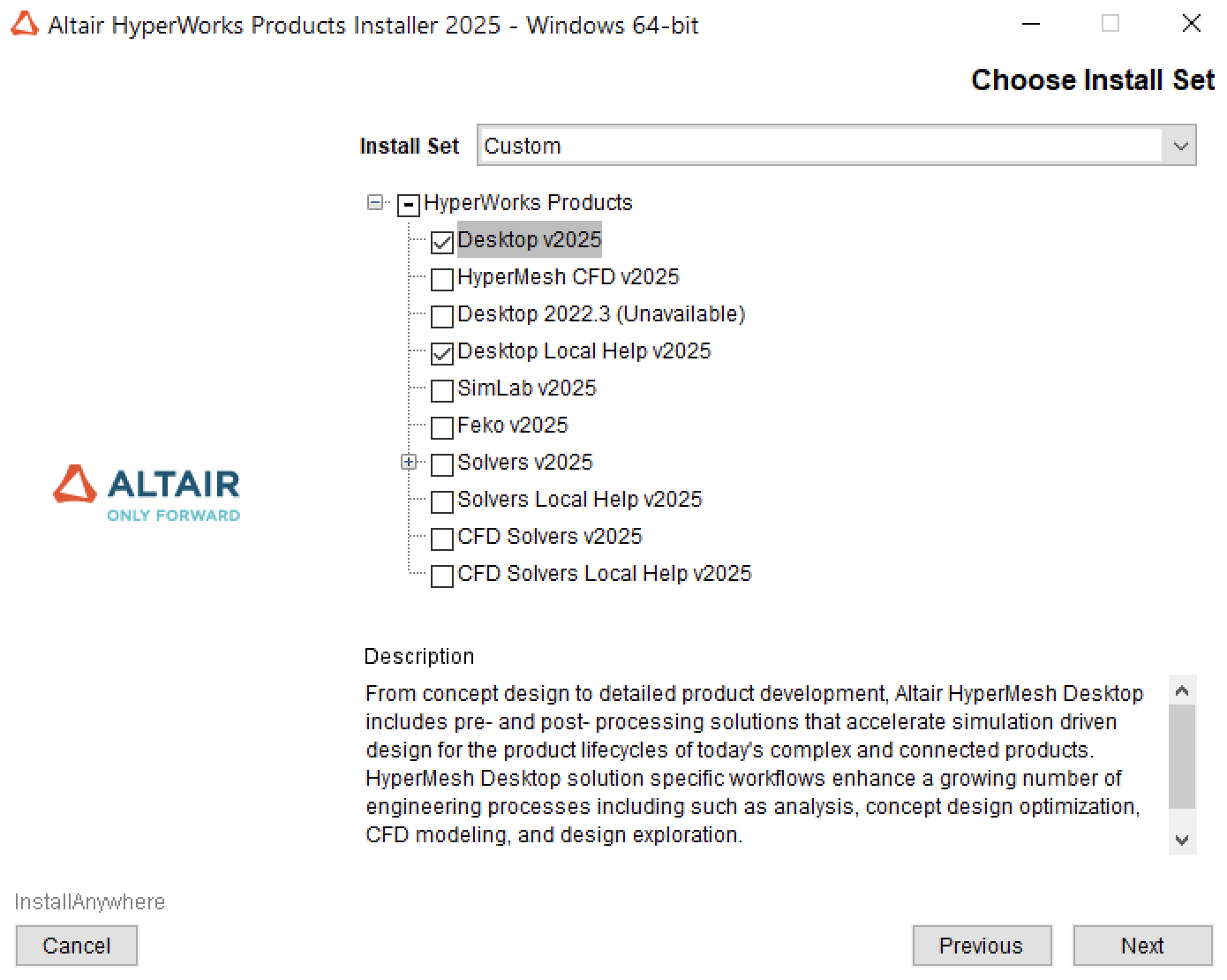
Attention, you need to choose:
Desktop v2025Desktop Local Help v2025
Allways select Help !
Don’t select everything if you don’t use it; it takes up a lot of disk space and time.
- During installation, the license port address will be requested. You should enter for research
- You receive the licence port @ server by e-mail.
- It is also necessary to validate the requests to open the firewall during the first launch of each module.
Nomadic users must be connected by VPN
Request for disk access I:\
contact us