
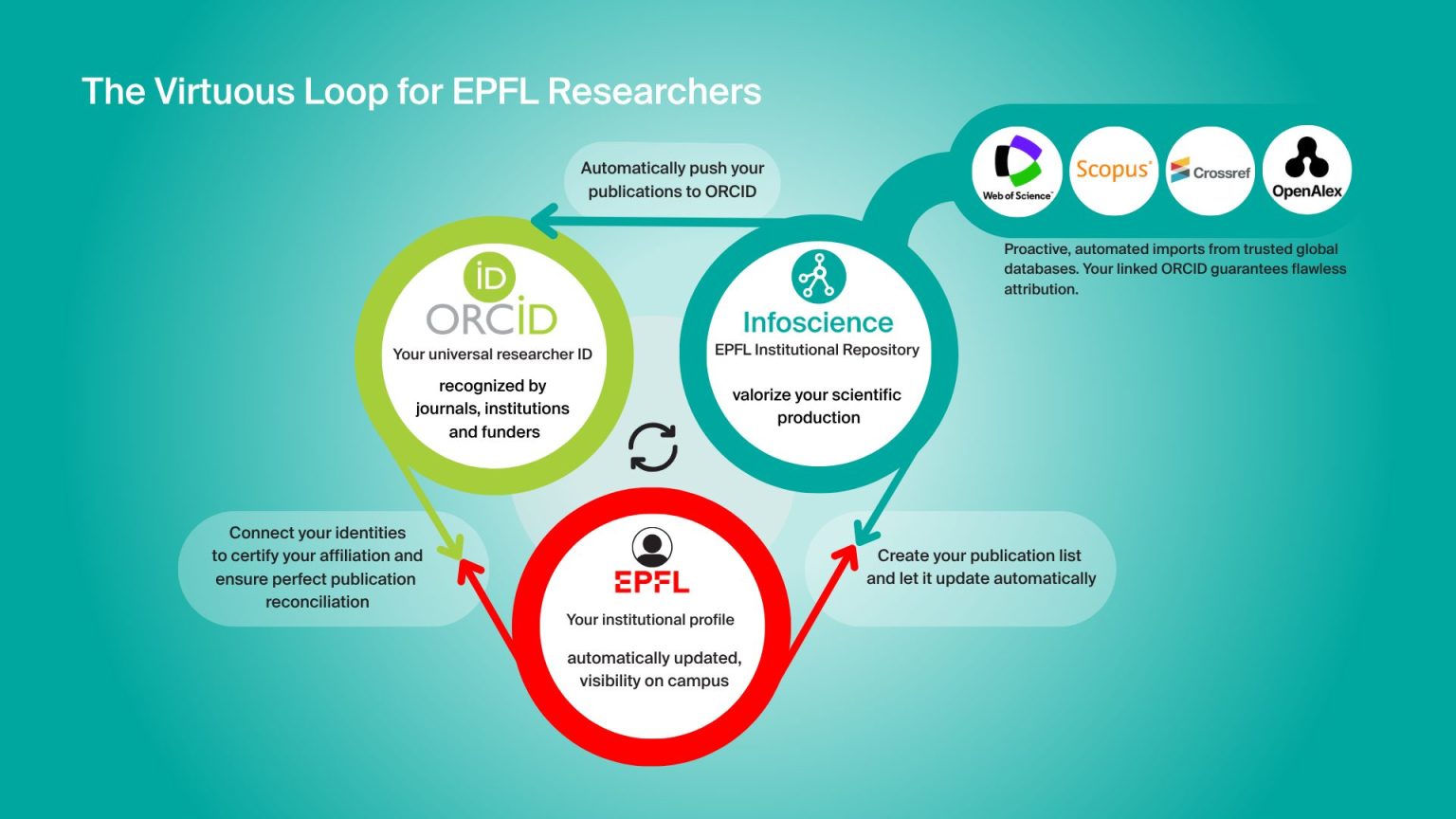
ORCID provides a persistent, portable identifier that uniquely distinguishes you and ensures your affiliation with EPFL is verified and trusted. By connecting your ORCID iD to your EPFL profile and to Infoscience, your publications and activities can be automatically propagated and maintained with less manual effort, saving you time and reducing errors. An ORCID iD is also increasingly required by funders and publishers, making it an essential tool for managing your research outputs throughout your career.
Create and connect your ORCID iD today to benefit from seamless integration with EPFL and Infoscience!



What is ORCID?
ORCID, which stands for Open Researcher and Contributor ID, is a global, community-built, not-for-profit organization sustained by fees from its member organizations, which include EPFL. ORCID provides a free, unique, persistent identifier (PID) for individuals to use as they engage in research, scholarship, and innovation activities. ORCID helps researchers, post-docs, employees, and students improve the discoverability of their work.
The ORCID iD is a 16-digit number with an associated record (sometimes called a profile) that stores automatic links to all your research, and links all your research with you. Unlike other author IDs, ORCID is integrated into many information systems used by publishers, funders, institutions, and other research-related services connecting them and allowing authenticated information to be “entered once and reused often”.
Why use ORCID
Your ORCID identifier belongs to you alone and will remain yours throughout your academic career (and for life), regardless of the institution at which you work. This improves the recognition and discoverability of you and your research outputs and activities.
ORCID solves several naming issues, including accents and special characters, name changes, multiple family names, shared names, different versions of names and name transliteration.
At EPFL, your affiliation is certified by the institution via the ORCID Member API — not self-declared. This strengthens your credibility with publishers and funders who verify profiles.
Your ORCID iD is the key that makes the Infoscience automatic pipeline work: publications harvested from Web of Science, Scopus, Crossref and OpenAlex are attributed to you reliably because of your linked identifier.
You control what is visible: each section of your ORCID record can be set to public, trusted parties only, or private.
The SNSF requires an ORCID iD in the CV submitted with all grant applications. Reviewers can consult your public ORCID profile directly — so keeping it up to date matters. The SNSF Portal allows you to import your publications directly from your ORCID record into your application, with no manual re-entry. At EPFL, this is effortless: once your ORCID is linked to your EPFL account and your publications are validated in Infoscience, they are automatically pushed to your ORCID profile — so your record is always ready when you submit to the SNSF.
Correctly attributing authorship is a common issue for publishers. For this reason, many are now incorporating ORCID identifiers into their manuscript submission and peer review systems.
How to get an ORCID
Directly via orcid-integration.epfl.ch
If you don’t have access to the “ORCID Integration at EPFL” application but would like to create an ORCID account, you can register at orcid.org/register.
Link your ORCID record to EPFL
Directly via orcid-integration.epfl.ch
This application (accessible on the EPFL network or via a VPN connection) will add your EPFL affiliation to your ORCID profile and add your ORCID iD to your EPFL People page simultaneously. This means that your affiliation is certified by EPFL and your identifier by ORCID. Currently, this service is intended only for EPFL collaborators. Bachelor’s and Master’s students, as well as academic guests, cannot use it yet.
Link your ORCID record to Infoscience
Follow the steps: go.epfl.ch/help-infoscience-profile
ORCID iDs greatly facilitate the automation of the entire EPFL publication workflow. Infoscience uses your linked ORCID iD in three ways:
- Infoscience continuously harvests publications from major scholarly databases (Web of Science, Scopus, Crossref, OpenAlex) and uses your ORCID iD to attribute them reliably to you — with no manual entry required.
- When depositing a new record manually, you can pre-fill metadata directly from your ORCID profile using the “Import metadata from an external source” feature in Infoscience — select your collection, choose ORCID as the source, and your publication data is imported automatically.
- Once you review and validate your records in Infoscience, they are automatically pushed to your ORCID profile, and your people.epfl.ch publication list updates accordingly.
What does your ORCID profile contain?
Your ORCID record is more than a publication list. It can include: works (articles, datasets, software, patents, preprints), affiliations, funding and grants, awards and distinctions, peer review and editorial activities, education and qualifications, and links to other identifiers (Scopus Author ID, ResearcherID) consolidated under one umbrella. All sections are independently configurable — you control what is public, visible to trusted organizations only, or kept private.
Optimize your ORCID
- Add all the other versions of your name.
- Enable auto-updates of your ORCID record from other information systems (such as Web of Science, Scopus, Europe PMC, CrossRef, DataCite, and The Lens) via the Search and link wizards.
- Make sure you include your ORCID iD when prompted! This applies to manuscript submission systems, grant application forms and other research workflows. Many publishers collecting iDs are passing them on to Crossref and DataCite, which will automatically update your ORCID record with authenticated works.
- Add your ORCID iD to any documents relating to you! Add it to your CV, web page and email signature, among other places.
- Use your ORCID record to share information about your work! You can share your work automatically between information systems with granted permissions, or manually whenever you can access your ORCID record from forms (for example, to report research outputs in a funder monitoring system).