- Turn on the monitor by pressing on the green button from the TV remote.
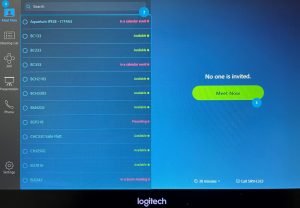
Meet now (start an instant meeting)
- Tap on Meet Now icon on the menu bar
- Select rooms, contacts or Call 323/SIP or using Search to invite.
- Tap Meeting Now to start an instant meeting.
Meeting list (Start a Scheduled Meeting)
- Tap on “Meeting List” icon on the menu bar.
- Tap your Scheduled topic on the meeting list.
- Tap Start to start the meeting.
Join (Join a Meeting)
- Tap on Join icon on the menu bar.
- Enter the Meeting ID on the number pad.
- Tap Join to start the meeting.
Presentation (Share a content)
- Tap the Presentation icon on the menu bar.
- Choose the device: Desktop or iPhone/iPad
- Desktop:
- Using Zoom App: Click Share screen and enter Sharing Key dispayed on the controller.
- Using Browser: Go to Share.zoom.us, enter room Meeting ID and the Passcode
- Using HDMI: connect the HDMI cable to your laptop and begin the presentation.
- iPhone/iPad:
- Tap Screen Miroring
- Choose room, ex. BC133
- Enter passcode dispayed on the controller.
- Tap Stop Sharing when you are done.
Phone (not available)
Invite someone when in a meeting
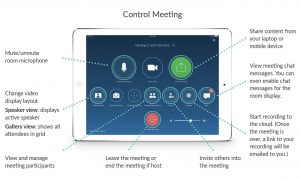
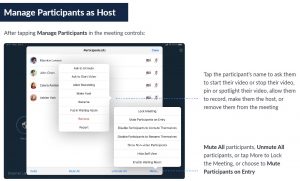
- Tap Manage Participants on the Controller.
- Tap Invite from the bottom left and select one options below:
- by Contacts: use Search or select one from list and tap on Invite.
- by Email: tap on To, enter an email address and Sent invitation.
- by call a SIP/H.323: enter IP address and then Call.
Transfert a meeting to the room:
- Forward your calendar to the room
Summary: